Designing a Memorable Father's Day Celebration
Father's Day is a moment to pause and show genuine appreciation. Whether you're planning a backyard barbecue, a quiet family dinner, or a surprise gathering, the invitation sets the tone. A well-designed flyer does more than share details—it conveys the spirit of the event. For those who aren't professional designers but still want a polished, personal result, a thoughtfully crafted Father's Day Party Flyer template becomes an invaluable resource. It removes the guesswork from layout, typography, and print preparation, letting you focus on the celebration itself.
Beyond a Mock-up: A Functional Design Asset
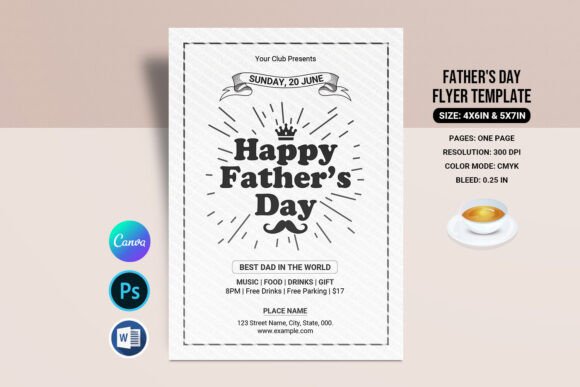
It's important to understand what you're getting with this type of template. This isn't a static mock-up image for presentation purposes. It's a fully editable, production-ready file. The Father's Day Flyer Template is designed for immediate use. You receive the working files—typically in formats like Adobe Photoshop (PSD) and Microsoft Word (DOCX)—so you can customize every element. This includes changing text, swapping out placeholder images with your own photos, and adjusting colors to match a specific theme or brand palette. The inclusion of both a 4x6 inch and a 5x7 inch size is a practical touch, covering standard postcard and invitation dimensions without requiring you to manually resize and risk layout issues.
The technical specifications are geared toward professional results. A resolution of 300 DPI ensures sharp text and images when printed. The CMYK color mode is the standard for professional printing, preventing the color shifts that often happen when using RGB files. The 0.25-inch bleed is a critical detail; it's the extra margin around the design that prevents unprinted white edges after trimming. For someone managing a project on a tight timeline, having these technical details pre-set is a significant advantage. It means the file you customize is the same file a print shop can use directly, streamlining the process from design to delivery.
The Practical Power of Editable Files
The real value of this Father's Day Party Flyer lies in its flexibility. Working with a Photoshop PSD file offers granular control. Each text layer, graphic element, and image placeholder is separate, allowing for precise adjustments. You can apply your own font pairing ideas if the provided typeface doesn't suit your vision, or use the recommended display font included with the template to maintain the intended aesthetic. The help file with a font download link is a small but crucial inclusion that ensures consistency and avoids licensing pitfalls.
For those less comfortable with Photoshop, the Microsoft Word DOCX version is a game-changer. It democratizes the design process. A small business owner, a community organizer, or a family member can open the file, replace the placeholder text with their event details, and print it at home or at a local copy shop. This dual-file approach acknowledges different skill levels and software access, making the template a versatile piece of design assets. It's not just for graphic designers; it's for anyone tasked with creating promotional or personal materials.
Where This Style Truly Shines
The visual personality of the template—a blend of classic and celebratory elements—makes it adaptable. Its strength isn't in being a niche creative font specimen, but in being a complete communication tool. The style works exceptionally well for:
- Local Business Promotions: A restaurant, hardware store, or brewery can use it to advertise a Father's Day sale or special event. The professional layout enhances brand identity and brand perception, signaling that the establishment cares about details.
- Community and School Events: Organizing a father-child picnic or a school fundraiser? The template provides a quick, professional-looking solution that can be printed on standard paper or cardstock.
- Personal Family Gatherings: The personal touch of a custom invitation for a family reunion or dinner makes the event feel more special. The ability to add a personal photo directly into the design elevates it beyond a generic e-vite.
- Digital Use: While designed for print, the high-resolution files can be adapted for social media graphics or email newsletters. A cropped version works perfectly as an event announcement post.
The design avoids trendy extremes, opting instead for a balanced, readable layout. This is key for readability and visual hierarchy. The headline is prominent, the event details are clear, and any secondary information is neatly organized. This thoughtful structure guides the viewer's eye naturally, which is the hallmark of good editorial design and web design principles applied to print.
Making It Your Own: Practical Guidance
When you open the file, start by assessing the existing structure before making changes. The designer has already established a visual hierarchy. Your job is to populate it with your information, not to reinvent the wheel. Replace the placeholder text first, ensuring all details—date, time, location, RSVP information—are correct and clearly stated.
If you choose to modify the font pairing, do so with care. The original typeface selection was made for a reason—it balances personality with legibility. If you swap fonts, test the new combination at the actual print size. A script font or handwritten font might look beautiful on screen but can become illegible when printed small. Stick to one display font for headlines and a clean sans serif font or serif font for body text to maintain clarity.
For images, use high-resolution photos. A blurry or pixelated personal photo will undermine the professional template. The bleed area is there for a reason—if you're changing the background color or adding a full-bleed image, extend your design elements to fill that 0.25-inch margin. When saving your final file for print, double-check that you're exporting with the bleed included.
Finally, consider the broader context. This Father's Day Flyer is a piece of your overall communication. Its modern typography and clean layout contribute to a sense of professionalism and care. Whether you're a small business owner reinforcing your brand identity or a family member creating a keepsake, the goal is the same: to create something that feels intentional and worthy of the occasion. The template provides the foundation; your personal touch makes it meaningful.